
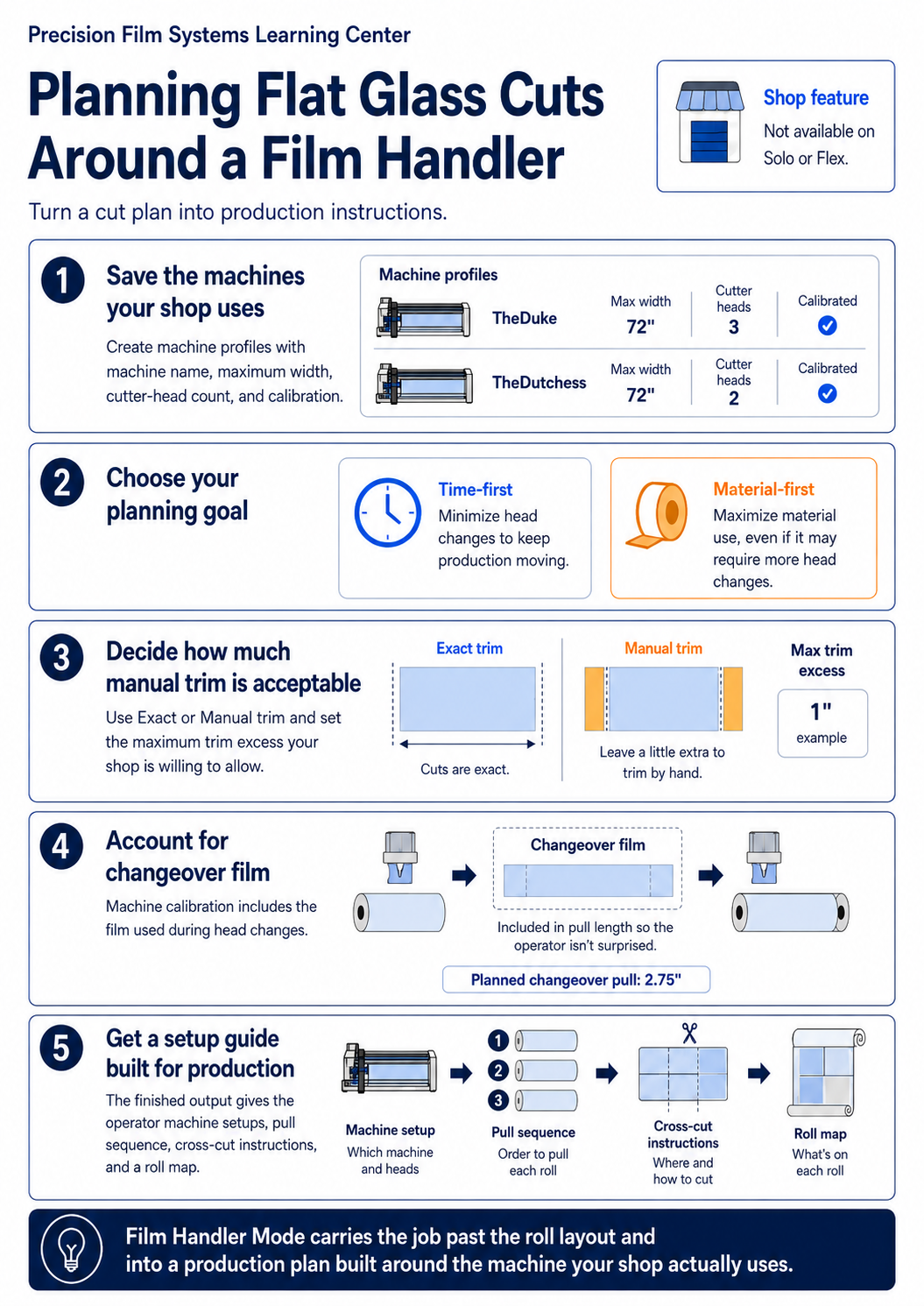
Film Handler Mode was added to Precision Film Systems after requests from beta users who wanted the cut plan to account for the way they actually produce film through a Film Handler.
A standard cut plan answers where the windows fit on the roll. Film Handler Mode takes the machine into account too, including the available cutter heads, the shop’s production preferences, and the setup needed to work through the roll.
Film Handler is a Shop feature and is not available on Solo or Flex.
Set up the machines your shop uses
A shop can save one or more Film Handler profiles in Precision Film Systems.
Each profile includes the machine name, maximum width, number of cutter heads, and the calibration information needed for production planning. One machine can be set as the default, while another can still be selected when a different machine makes more sense for the job.
On a multi-scope project, different scopes can use different Film Handler profiles.
Once those profiles are saved, the machine setup does not have to be entered again every time a cut plan is built.
Choose whether time or material matters more
Film Handler Mode gives the shop two planning objectives: Time-first and Material-first.
Time-first favors plans with fewer cutter-head changes. That can make the production run easier to work through, although it may use more film.
Material-first puts more weight on film use and efficiency, even when that means additional cutter-head changes.
There is no single setting that makes sense for every job. The choice depends on whether the shop would rather reduce machine changes or push harder on material use for that particular run.
Decide how much manual trimming is acceptable
The cut policy can be set for exact cuts or allow a manual-trim allowance.
Some shops may want the Film Handler to produce pieces as close to the final measurement as possible. Others may be comfortable leaving a small amount of extra film and trimming it by hand afterward if that keeps the production setup simpler.
The maximum trim excess lets the shop define how much extra material it is willing to allow.
This gives the operator another way to balance the machine setup against the way the film will actually be finished.
Account for the machine during the material plan
Film Handler profiles also include changeover calibration.
Those settings allow Precision Film Systems to include the film used during cutter-head changes when it builds the production plan instead of treating those changes as if they use no material.
The shop enters the measurements for its machine once and Precision Film Systems uses them when Film Handler Mode is selected.
The finished plan is built for production
After the cut plan is created, Film Handler Mode generates a Film Handler Setup Guide.
Instead of only showing where the pieces fit on the roll, the guide organizes the run around machine setups and pull instructions.
The operator can see the cutter-head positions for each setup, the pull sequence, when cross-cuts are made, and which pieces are produced along the way.
A segmented roll map provides a visual reference for the same production plan.
The point is to give the person working at the Film Handler something they can follow from the cut plan through the production run without having to translate a standard roll layout into machine instructions themselves.
Where Film Handler Mode fits
Shops that do not use a Film Handler can keep using the normal Precision Film Systems cut-planning workflow.
For shops that do, Film Handler Mode adds the machine to the planning process.
The shop saves its equipment, chooses how it wants the job planned, and generates production instructions around the Film Handler that will actually be used.
The window measurements still start the job. Film Handler Mode changes what happens after those measurements become a production plan.
Frequently asked questions
Can I save more than one Film Handler?
Yes. A shop can create multiple machine profiles with their own width, cutter-head count, and calibration settings.
Can different scopes use different machines?
Yes. A different Film Handler profile can be selected for individual scopes on a multi-scope job.
What is the difference between Time-first and Material-first?
Time-first favors fewer cutter-head changes. Material-first gives more priority to material efficiency, even when that may require additional changes.
Can Film Handler Mode allow extra material for hand trimming?
Yes. The Manual trim policy lets the shop set how much extra material it is willing to leave for trimming after the piece comes off the machine.
What does the Film Handler Setup Guide include?
The guide provides the machine setups, cutter-head positions, pull sequence, cross-cut instructions, and a visual roll map for the production run.
Which plans include Film Handler Mode?
Film Handler Mode is included with Shop. It is not available on Solo or Flex.